Timestral on CPU: Latency, Throughput and When You Still Need a GPU
 Timestral Team
A practical look at CPU inference for Timestral: vendor latency numbers, what changes with model size and horizon, and how to size a forecasting service without a GPU.
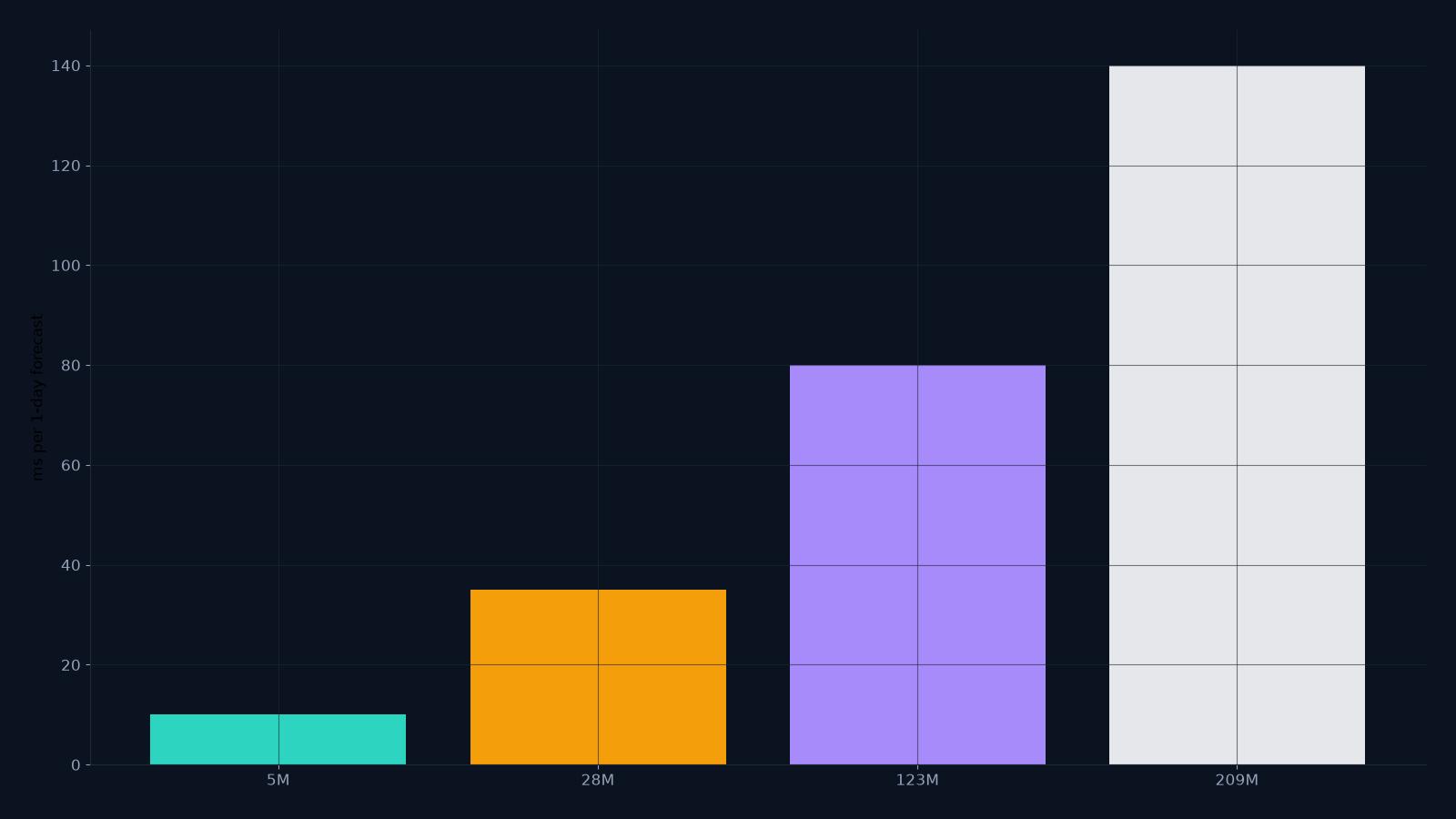
One of Timestral’s practical advantages is that it does not require a GPU. The largest model is 209M parameters, and Mistral reports one-day-ahead forecasts on a standard eight-thread CPU in roughly 10 ms for the 5M model and 140 ms for the 209M model, using three weeks of 15-minute history.
Those numbers are a starting point, not a capacity plan. This guide explains what moves them and how to size a service.
CSV forecast studio
Paste a series, get a probabilistic forecast.
One value per row, or a date column plus one or more numeric columns. Timestral returns a median forecast and a likely range. The demo runs on the public Hugging Face Space; the API is the paid product.
What the vendor numbers mean
The reported benchmark is a specific workload: one series, three weeks of 15-minute data, one day ahead, eight CPU threads. Change any of those and the latency changes:
- More series → more compute per request.
- Longer horizon → more output steps, more compute.
- Longer context → more attention, more compute.
- Larger model → more parameters, more compute.
- More threads → lower latency, up to a point.
The 5M model is the high-volume option. The 209M model is the accuracy option. Measure both on your hardware and your input shape.
Throughput vs latency
A single request in 140 ms sounds slow for a web API, but throughput is what matters for batch scoring. If the service can run several requests concurrently on the same CPU, the cost per forecast can be much lower than the latency suggests.
For an interactive product, 140 ms is fine. For batch scoring 100,000 series, the small model and a queue matter more than the headline latency.
A simple capacity estimate
- Measure the latency of one request at your input shape on your target machine.
- Decide the concurrency you can run without saturating the CPU.
- Throughput ≈ concurrency / latency.
- Add a safety margin for the queue, retries and peak traffic.
- Compare the cost of CPU time with the revenue per forecast.
Do not use the vendor’s 10 ms as a promise. Use it as a reason to benchmark the small model first.
When a GPU helps
- Very high request volume with tight latency.
- Very large batches.
- Fine-tuning (not zero-shot inference).
- Long-context inference across many series.
For a modest API, a CPU worker is often enough. The model size is the main lever: 5M vs 209M is a much bigger difference than CPU vs GPU for a single request.
Deployment options
- CPU worker — simplest; good for the 5M/28M models and moderate volume.
- GPU worker — higher throughput; useful for the 209M model at scale.
- Hugging Face Space — the public demo; convenient for evaluation, not a production SLA.
- Dedicated endpoint — a managed inference endpoint with a stable quota.
The studio’s public demo runs on a Hugging Face Space. The paid API is intended for a dedicated quota; the demo’s ZeroGPU limit is not a production capacity plan.
What to measure
- p50 and p95 latency per request.
- throughput at a fixed concurrency.
- memory per worker.
- error rate under load.
- cost per 1,000 forecasts.
What to read next
- What is Timestral? — the model family.
- Timestral long context — the 32,768-step context.
- How to evaluate forecasts — accuracy and calibration.
- API pricing — one credit per forecast call.
FAQ
Can Timestral run on a Raspberry Pi?
The 5M model may run on a small device, but the memory and latency depend on the runtime. Measure before promising an edge deployment.
Is CPU inference accurate enough?
The model is the same; CPU vs GPU changes speed, not the math (aside from floating-point differences). Accuracy is a model and data question, not a hardware question.
Do I need a GPU for the API?
Not necessarily. Start on CPU with the 5M or 28M model, measure, and add a GPU only if the throughput or latency requires it.